Everything in the Glytiq workspace
Every module in Glytiq, the job it does and its limits: rankings and research, website analytics, the companies behind your visits and the follow-ups your team sends, with the reports and connections around them.
Every module below is included. Glytiq goes open source during 2027 and has no plans: your own provider accounts pay for each check, and each module says which one it runs on.
Updated


Daily Google ranks, research and reports
Glytiq checks every tracked keyword in Google once a day and keeps the organic Top 30, in 21 countries plus selected cities, on desktop or mobile. Each keyword's daily check is paid on your own DataForSEO account.



Rank tracker
Each keyword shows the page that ranks, the SERP features around it and whether a Google AI Overview on that results page cites your domain.
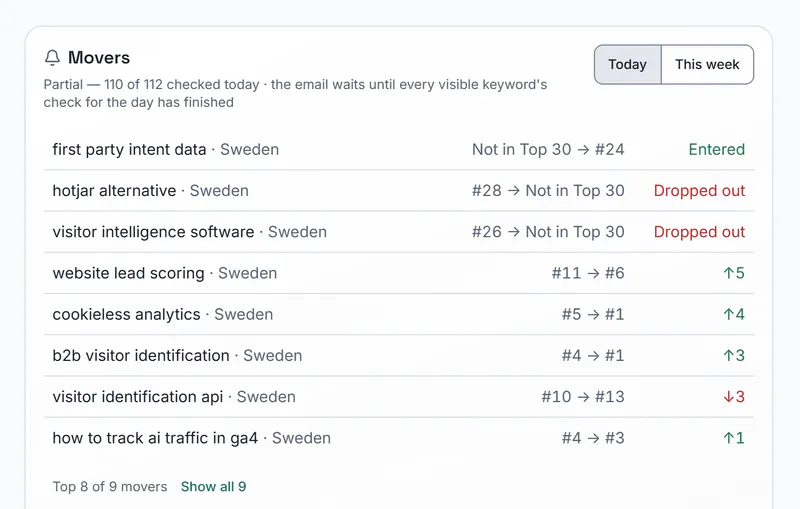
Movers lists the keywords that went up or down since the last check. Checks start at 02:00 UTC, shown in your site's own time zone.
Groups, share of voice, visibility and estimated traffic sit on the same page, and a change of ranking URL is flagged. Pin competitors and Glytiq tells you when one passes you. Rank history from Wincher or Ahrefs comes in as a CSV file at no cost.
Limits: Google only, organic Top 30, once a day. A page below 30 reads Not in Top 30, never a number, and desktop and mobile each use a keyword slot.
Included; it runs on your own DataForSEO account.
Product screen with fictional data from northpeak.example Landing pages
Landing pages turns stored ranks and Search Console data into a list of your pages: which bring the most estimated search traffic, which are new or lost, and for each page its ranking keywords, its latest on-page check and the identified companies that visited it.
It makes no provider requests.
Limits: Estimated traffic is modelled from Ads search volume and a click-through curve, not taken from Search Console clicks.
Included; it runs on your own DataForSEO account.
Keyword research
Explore finds related keywords for a seed term.
Gap, Shared and Unique compare your keywords with a competitor's domain, and intent sorts a list by what searchers want. AI suggestions and Search Console Opportunities propose keywords worth tracking.
Limits: Each research run is a request on your own DataForSEO account. Keyword data is per country, not per city.
Included; it runs on your own DataForSEO account.
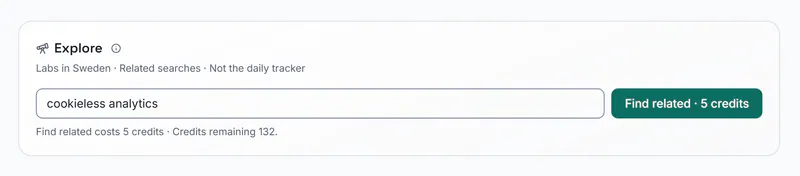
The credit cost is shown on the button before each run.Product screen with fictional data from northpeak.example On-page check
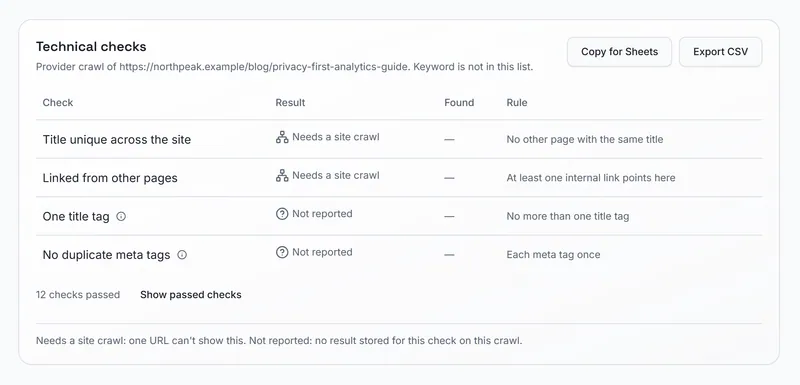
Checks one URL for technical issues, gives a technical score from 0 to 100 and says whether a keyword appears as a whole word in the title, the H1, the meta description and the URL.
Limits: One URL per run, with no site crawl, JavaScript rendering or Lighthouse test. A repeat check of the same URL and keyword within a week costs nothing.
Included; it runs on your own DataForSEO account.
Single-URL check.Product screen with fictional data from northpeak.example Backlinks and SERP Benchmark
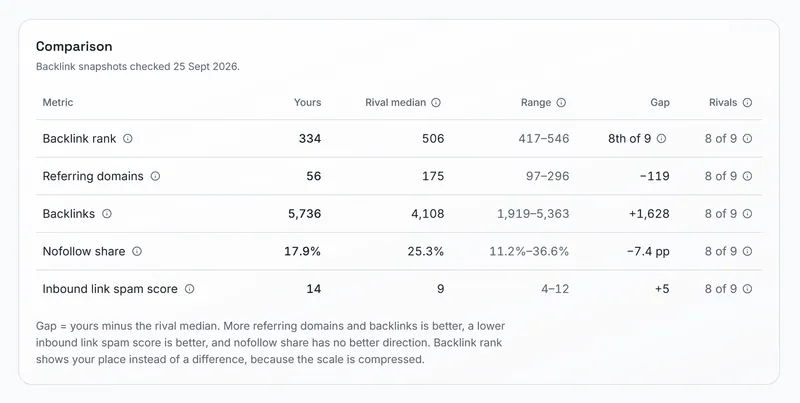
Backlinks summarises a domain or URL from DataForSEO's backlink index: referring root domains, backlinks, a backlink rank from 0 to 1,000, the share of follow and nofollow links and a list of referring domains you can open link by link.
SERP Benchmark puts your ranking page's backlink figures next to the median of up to 10 pages from the stored top 10 for the same keyword.
Limits: No domain rating or authority score, no history of new and lost links and no anchor texts. SERP Benchmark compares backlink figures only, and every fetch is a request on your own DataForSEO account.
Included; it runs on your own DataForSEO account.
Product screen with fictional data from northpeak.example Rank report and rank emails
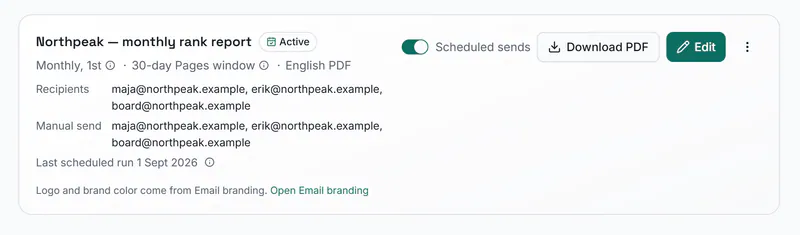
A PDF of your Top 30 ranks on a weekly schedule (Mondays) or a monthly one (the first of the month), built from stored ranks with your own logo and no new data requests.
Rank alerts arrive by email, including when a pinned competitor passes you, and a summary of the week arrives on Monday.
Limits: The report is in English and lists the top 40 keywords by estimated traffic.
Included; it runs on your own DataForSEO account.
Product screen with fictional data from northpeak.example


Your Google Maps rank, point by point around the business
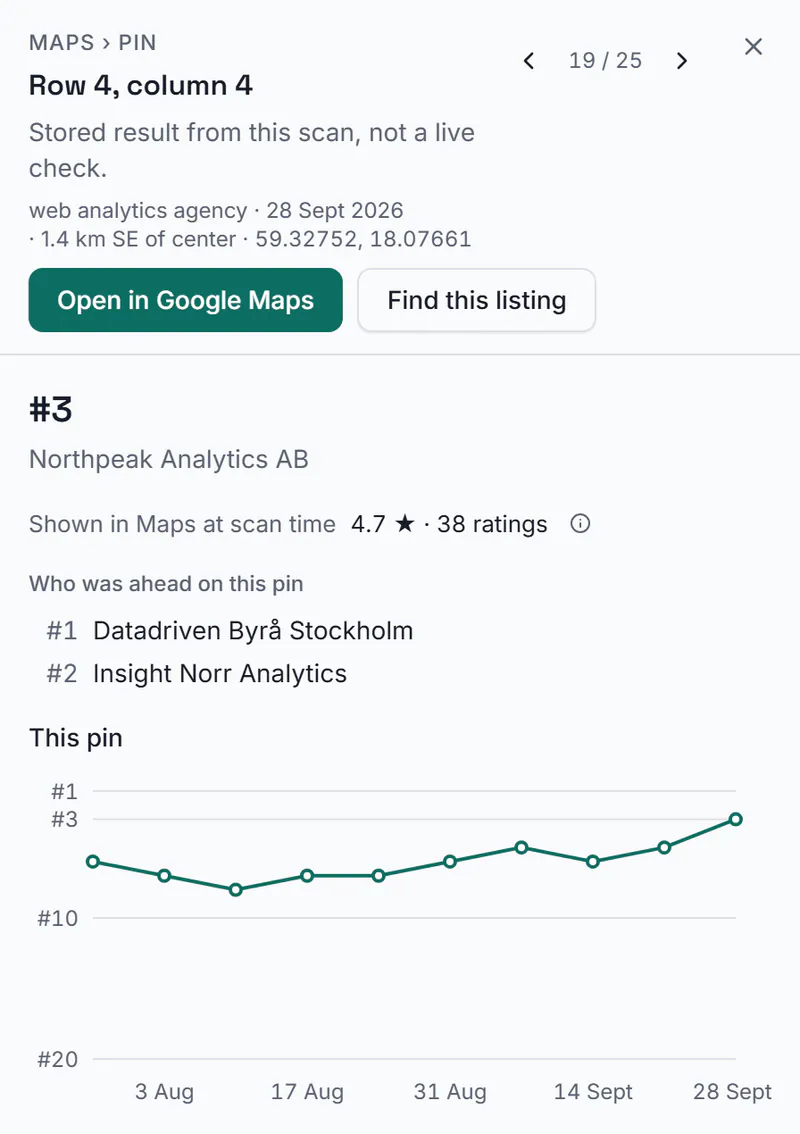
Maps checks where your business appears in Google Maps results, up to position 20, on a 3×3, 5×5 or 7×7 grid of points around one location per site, once a week.

Maps grid
Each point is a search made from that spot.
The grid shows your position at every point, a point's sheet shows the listings ahead of you there, and History follows how often you were found in the top 3 and the top 20 from week to week. Results export as CSV.
One measurement is one keyword at one point in one scan, so a 5×5 grid with 3 keywords uses 75. The map preview uses OpenStreetMap, not Google's map.
Limits: Up to 10 keywords per location, desktop results, one scan a week at 11:00 site time plus Run now. No Google Business Profile connection and no review tracking.
Included; each scan runs on your own DataForSEO account.
Product screen with fictional data from northpeak.example

Visits from AI assistants and mentions in their answers
Glytiq measures two different things: the visits that AI assistants send to your site, and whether ChatGPT and Google AI Overviews mention your brand.

AI referrals
The AI Assistants channel in Traffic counts visits that start from ChatGPT, Perplexity, Claude, Gemini, Copilot and other assistants, and shows the pages they land on.
Limits: Counts only visits that carry a referrer or a UTM tag; a click from an assistant without one counts as Direct.
Included.
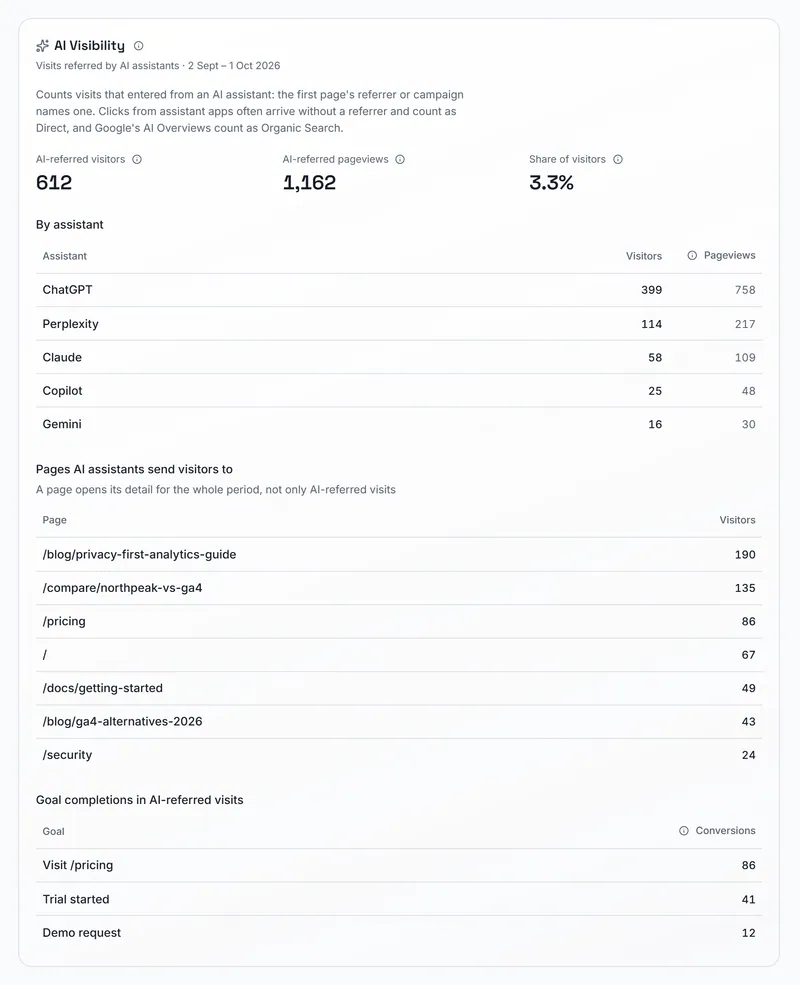
Counts visits that carry a referrer or UTM tag.Product screen with fictional data from northpeak.example LLM mentions
Checks every week whether ChatGPT and Google AI Overviews mention or cite your brand, which of your pages they cite and your share of voice against up to 3 competitor brands, with history and a sentiment reading for your own brand.
Limits: ChatGPT in US English and Google AI Overviews only, read from a provider's mention data rather than from your own prompts. Each run is a request on your own DataForSEO account, and the sentiment reading one on your own AI provider.
Included; it runs on your own DataForSEO account, and the sentiment reading on your own AI provider.

Website analytics without cookies
The Glytiq tracker records pageviews, custom events, outbound clicks, file downloads, 404 pages and Web Vitals without cookies, and keeps 24 months of history.


Traffic
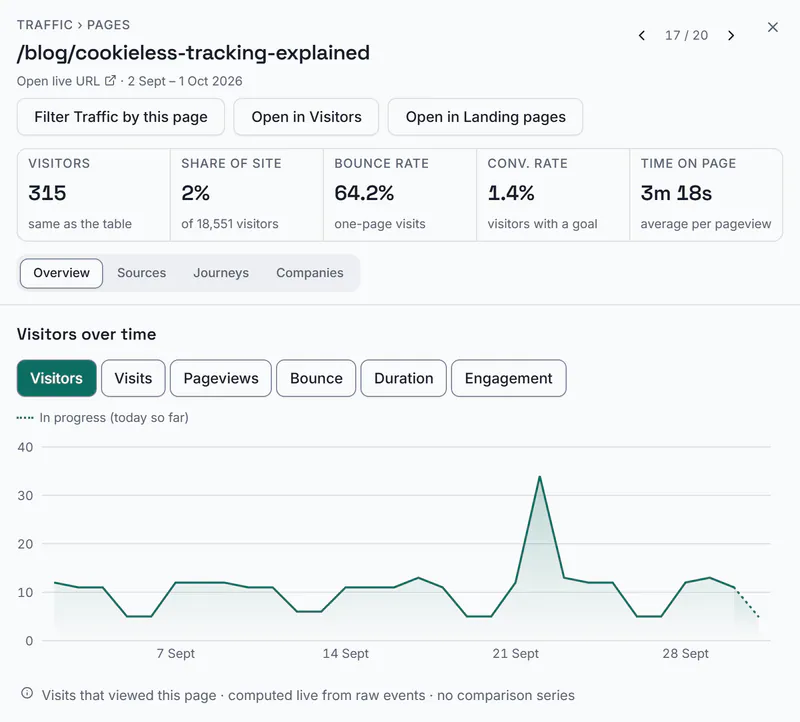
Traffic shows where visits come from, in channels that follow Google Analytics' groups plus AI Assistants, which pages they enter and leave by, where they are, which devices they use and the Journeys between pages.
Segments select whole visits, and a period that ends today is compared with the same elapsed time before it.
Bots, crawlers and data-centre traffic are filtered as events arrive. Notes mark what happened on a day, a gap in collection shows as a gap and never as a zero, and tables export as CSV or copy into a spreadsheet. Ask AI answers questions about the numbers and AI insights summarise them, on your own AI provider account.
Limits: Visits are told apart with a hash that changes every day, so a visitor who returns on another day counts again.
Included, on your own server.
Product screen with fictional data from northpeak.example Goals, funnels and revenue
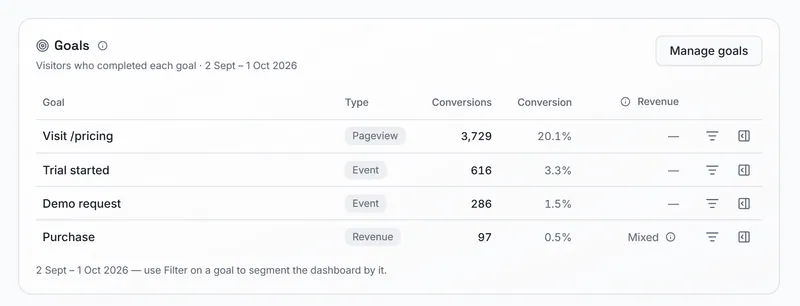
Goals count custom events, pageviews or revenue events.
Funnels follow visits step by step, loosely or strictly back to back. Revenue comes from a revenue value on your events and is reported per channel and source, in the currency you send.
Limits: Revenue is gross, refunds are not deducted, and it appears only where your site sends it.
Included.
Product screen with fictional data from northpeak.example 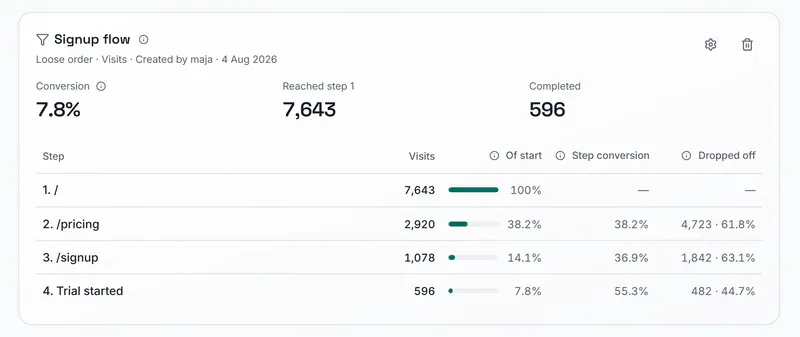
Product screen with fictional data from northpeak.example A/B tests and feature flags
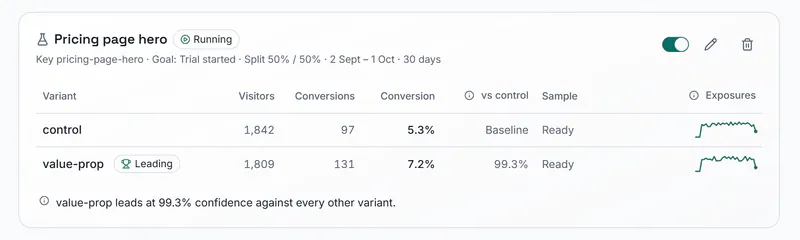
The tracker gives each visitor a variant and keeps it, and flags switch a feature on or off for some visitors without a deploy.
Results show visitors, conversion rate and exposure per variant, and no variant is called the winner before every variant has 100 visitors and 5 conversions.
Limits: The assigned variant is kept in the visitor's browser storage.
Included.
Product screen with fictional data from northpeak.example Health and uptime
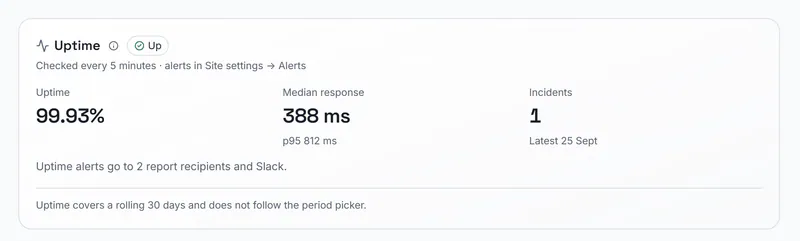
Web Vitals by landing page from real page loads, JavaScript errors grouped with the visits they hit, the 404 pages visitors reached, and an uptime check every 5 minutes that confirms a failure 20 seconds later before it alerts you.
Limits: Uptime is checked from one location, in the EU. Vitals, errors and 404s cover the last 90 days.
Included.
Product screen with fictional data from northpeak.example 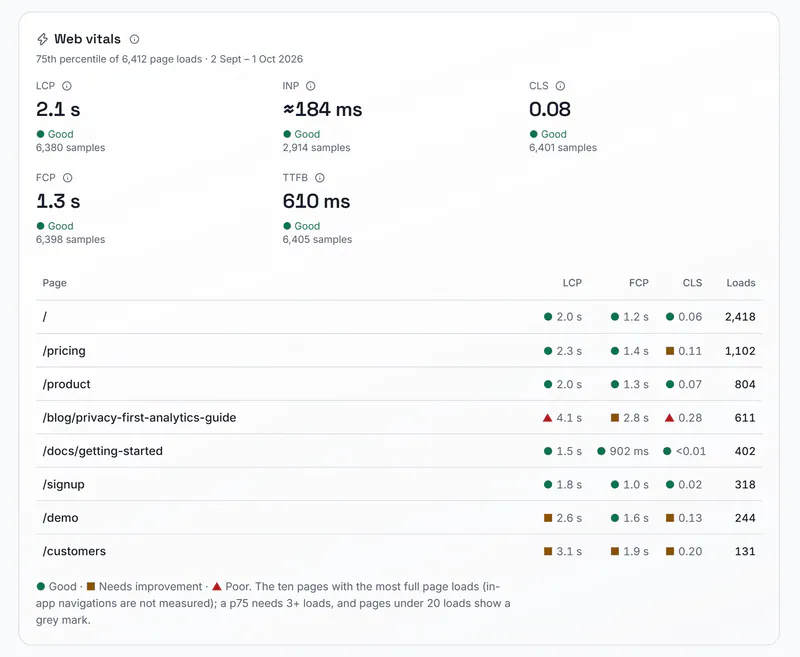
Product screen with fictional data from northpeak.example Share links and embeds
A read-only link or an embed shows a dashboard or a segment to people who have no Glytiq account.
Limits: Links have no password or expiry; revoking a link is how you close it.
Included. White-label, which removes the Glytiq footer from embeds, is included too.
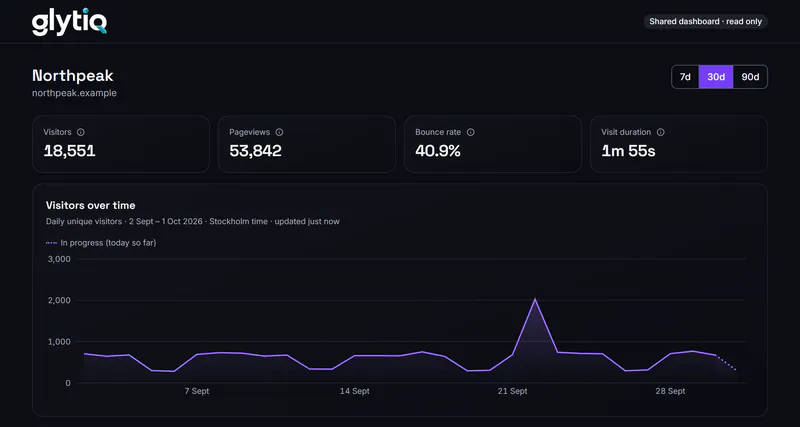
Public share pages and embeds are always dark.Product screen with fictional data from northpeak.example Stats API, exports and imports
The Stats API returns time series and breakdowns for one site with a read-only key, and says for each day whether collection was complete.
Analytics exports as CSV, and daily totals from a GA4-style export or a plain CSV can be imported.
Limits: One site per key. The import takes daily visitors, visits and pageviews only, without sources, pages or events.
Included.


Your site, live on the office wall
Warboard puts the visitors on your site right now, today's visits and pageviews, today's goals and the latest activity on a screen for the office, over a globe, a world map or a small planet.

Warboard
Studio schedules your own screens between the live views, and the office-wall mode rotates sites every 30 seconds or shows up to six at once.
Right now means the last 5 minutes.
Limits: Locations are country-level and approximate, and the clouds and weather are decoration.
Included.
Website visitor identification that names companies, not people
When a visit comes from a business network, Glytiq asks your own IP lookup provider which organisation the network belongs to and adds the visit to that company's record.


Visitors
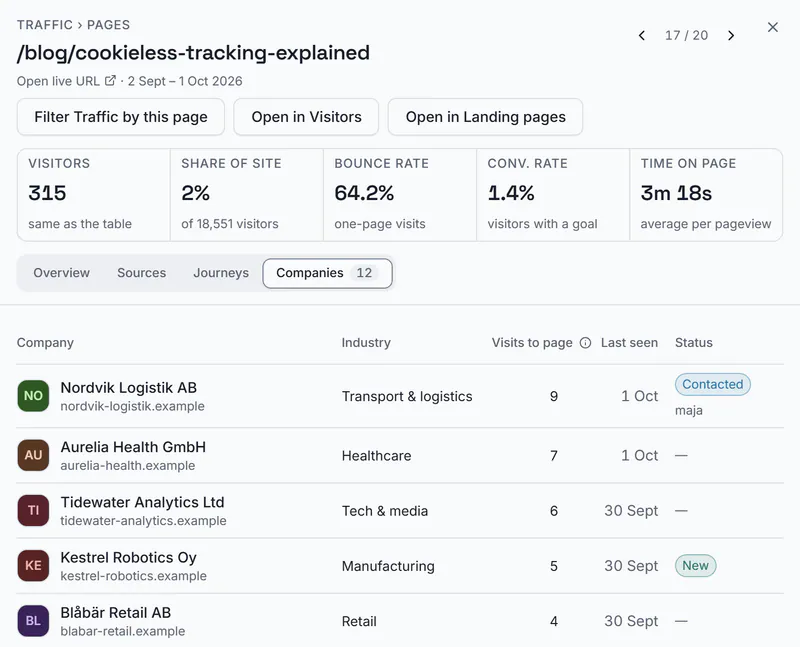
Visitors lists the identified companies with their visits, the pages they read, when they were last seen, a lead score, an owner and one next step.
Signals point out what changed, such as a company that landed on a page you rank for.
The company sheet holds an overview, the people you found, the activity and a light pipeline with status, deal value, labels and a pinned note. Industry, size and headquarters come from your own Apollo account or from AI research when you ask for them.
Limits: Companies, never people. Visits from home, mobile, education and government networks usually stay unidentified, and Glytiq publishes no match rate.
Included.
Product screen with fictional data from northpeak.example Finding the right person
To reach someone at the company, search your own Apollo, Lusha or Hunter account by role or title from the company sheet.
Email addresses are revealed only for the people you select, and the provider's credit cost is on the button.
Limits: Glytiq has no contact database of its own and never fetches phone numbers. Lookup results are kept for your team for 180 days unless a site admin chooses a shorter or longer time.
Included, with your own Apollo, Lusha or Hunter account.

Drafted follow-ups that your team sends
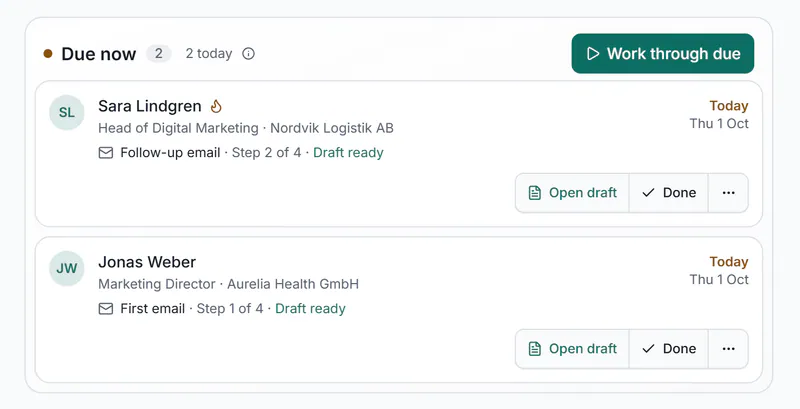
Add a person to the 7-day inbound cadence and Glytiq keeps the list of follow-ups due today, with a draft for each email or LinkedIn message.


Cadences and drafts
AI writes each draft from what the company read, or your team starts from its own templates, snippets and signature.
Your rep sends the message from their own mailbox, with mailto or Copy HTML, or from LinkedIn, then clicks Log as sent. A step can be run, skipped, moved or paused, and Undo reverses one done by mistake.
Limits: Glytiq does not send outreach, connect to a mailbox, use a tracking pixel or count opens and clicks. Inbound 7-day is the only schedule, and an AI draft is one request to your own AI provider.
Cadences are included. AI drafts run on your own AI provider account.
Product screen with fictional data from northpeak.example 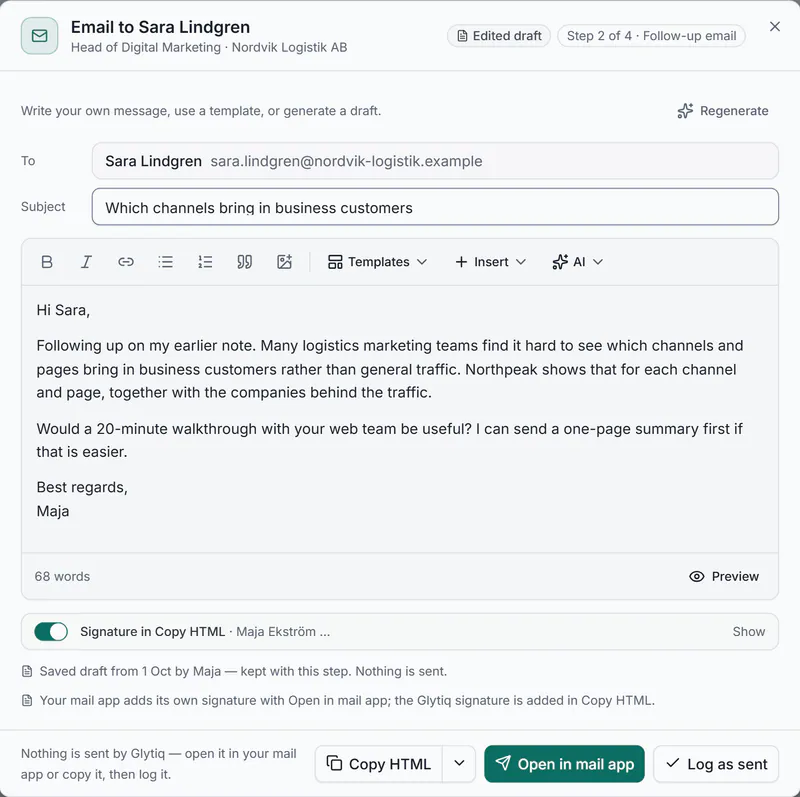
Product screen with fictional data from northpeak.example


Reports and alerts
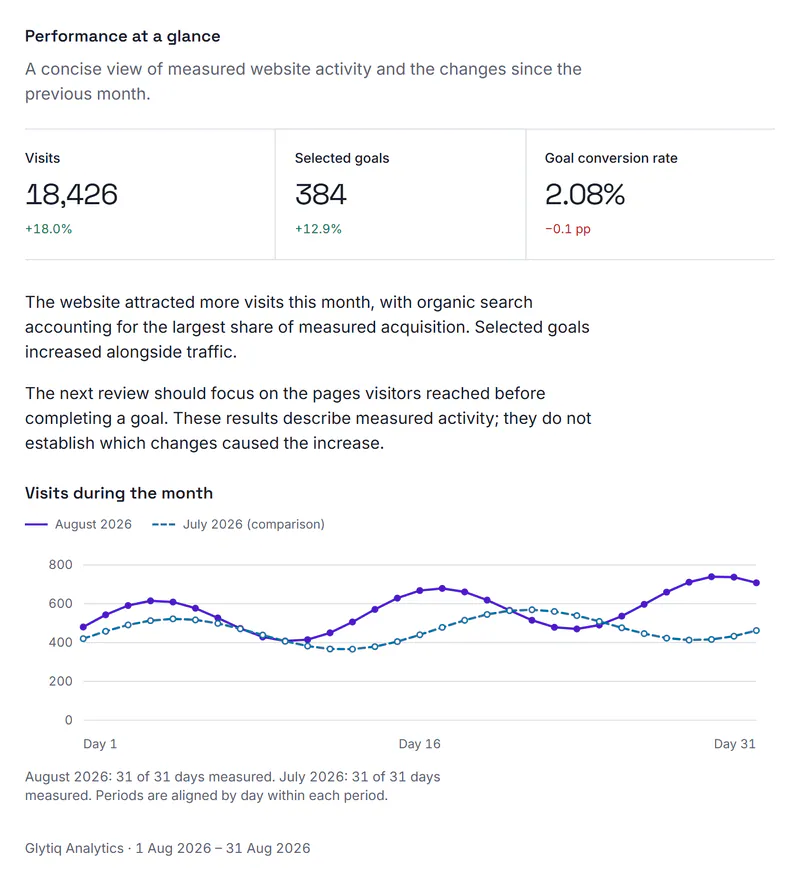
Client reports turn stored data into a reviewed A4 PDF, email summaries go out weekly or monthly, and alert rules check your traffic every 5 minutes.

Client reports
Each report opens in an editor where you review its text before the PDF is frozen as a version.
Start from one of two templates, Client performance (traffic, goals, Search Console and next steps) or SEO performance (ranks), then share the report by a secret link or send it on a schedule to its recipients.
A report can cover up to 5 websites with the same owner, and a site can keep up to 50 saved layouts.
Limits: Reports read stored data only and make no provider requests. The SEO section needs rank tracking on the site.
Included.
Report page with fictional data from north.example Alerts and email summaries
Six kinds of alert rule (a spike, a threshold, a goal, a new company, a company that matches a filter, and no traffic) are checked every 5 minutes and delivered by email, Slack, Microsoft Teams or webhook.
Uptime, rank and outrank alerts come on their own, and weekly or monthly summaries go to the recipients you choose. Glytiq sends these emails itself.
Limits: A rule for a value that drops below a threshold is judged on the last full day in your site's time zone, at most once a day.
Included.

Integrations and APIs
Glytiq connects to the CRM, email list, calendar and chat tools you already use, with your own accounts, and opens its data to other tools through read-only APIs.
CRM, email lists, calendars and chat
HubSpot, Pipedrive and Salesforce receive companies with a visit summary, contacts, deals marked won and notes.
Brevo and Mailchimp receive addresses into a list you already have. Cal.com and Calendly bring booked meetings into the company record, Slack, Microsoft Teams and webhooks carry notifications, and Google Search Console connects with your Google sign-in.
Limits: For synced contacts Glytiq keeps a salted fingerprint of the email address, not the address. A list transfer creates no list and sends no email.
Included.
Rank API and Looker Studio
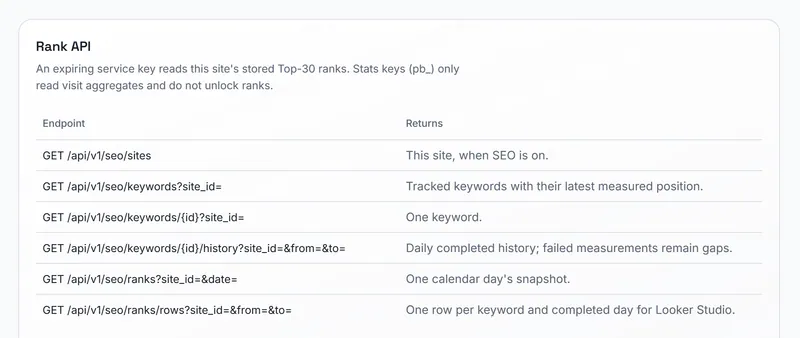
The Rank API returns stored ranks for one site with a read-only key that is valid for 90 days, and a Looker Studio connector uses the same key.
Neither makes provider requests.
Limits: Google Top 30 ranks only; Maps, Search Console and LLM data are not in the API. The Looker Studio connector is a community connector.
Included; it runs on your own DataForSEO account.
Product screen with fictional data from northpeak.example MCP
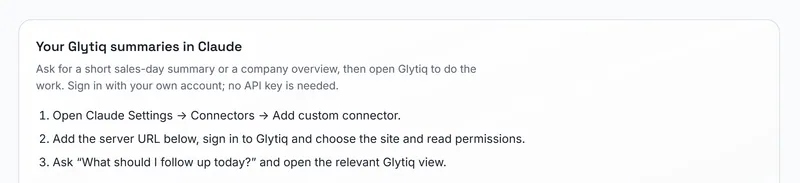
Claude and other MCP clients can read summaries of your workspace, such as your follow-ups for the day, your keyword ranks or the companies that visited a page, after you sign in with your own Glytiq account.
Limits: The tools only read. They cannot change data, send messages or make provider requests.
Included.
Product screen with fictional data from northpeak.example


Who it's for
Marketing sees which keywords and pages bring visitors, which channels and AI assistants send them and which goals follow, and sends rank reports on a schedule.
Sales sees the companies that came back to the pages that matter, with the pages they read, and works through today's follow-ups with a draft for each. Both teams open the same company record.
Agencies run several client websites from one account, with client reports and read-only dashboards. Add as many client websites and team members as you need, and white-label removes the Glytiq footer from embeds.

What Glytiq doesn't do
Keep another tool for these jobs. Each comparison page names the tools that go further: Glytiq vs Wincher, Glytiq vs Plausible and Glytiq vs Leadinfo.
- Send outreach. Glytiq drafts, and your team sends from its own mailbox or LinkedIn. There is no tracking pixel.
- Identify people. It identifies organisations, and not every visit.
- Sell contact data. People come from your own Apollo, Lusha or Hunter account, and phone numbers are never fetched.
- Crawl a whole site. The on-page check reads one URL at a time.
- Track other search engines or deeper results. Google's organic Top 30, once a day.
- Read Gemini, Perplexity or Claude answers for your brand. LLM mentions reads ChatGPT and Google AI Overviews.
- Build ad audiences from your visitors. There is no Google Ads or LinkedIn Ads connection.
- Replace your CRM. It syncs to HubSpot, Pipedrive or Salesforce.
What happens to your visitors' data
The privacy policy and the data processing agreement cover hosting and visitor data.
- The Glytiq tracker sets no cookies. Visits are told apart with a hash that changes every day.
- The visitor's IP address is used for that hash and for the company lookup, and it is not saved in the database.
- The app runs in Railway EU West (Amsterdam) and the database in TiDB Cloud on AWS Frankfurt.
- Other processors handle some of the work: an IP lookup provider for company identification, DataForSEO for search data, OpenAI and OpenRouter for the AI features, Resend for email and Stripe for billing.
- Whether your site needs a consent notice is your own assessment. A/B tests keep the assigned variant in the visitor's browser.
